
Stonemark Payment Resource Center –
IPFS Account Management and Premium Financing
Stonemark, Inc. is now part of the IPFS family. This resource center helps clients make secure insurance premium payments, manage financing accounts, and register for online access. With IPFS, policyholders, agents, and brokers gain simple, flexible tools to handle premium financing and streamline account management.
Make Payments to Your Stonemark / IPFS Account
IPFS provides secure, flexible options for paying your insurance premiums online or through traditional methods
Accounts Starting with 1080
If your account starts with 1080, log into your account on www.stonemarkinc.com to make payments.
Accounts Starting with MOK, NJN, FLS, or WAS
If your account starts with MOK, NJN, FLS, or WAS, manage your account and make payments through the IPFS payment portal.
Tip: Always ensure you are using the secure IPFS payment portal to protect your financial information.
Online Access for Agents, General Agents, and Brokers
Register online for 24/7 access to create premium finance contracts, check account status, make payments, view custom reports, and streamline operations.
Benefits of Online Access
- Create New Premium Finance Contracts in Minutes
- Check Account Status and View Custom Reports
- Make Secure Insurance Financing Payments Online
- Enhance Customer Experiences by Shortening Sales Cycles and Simplifying Account Management

Learn More and Register at ipfs.com
Sell more insurance and improve your bottom line with premium financing, payments, and other solutions designed to streamline operations, shorten the sales cycle, and enhance the entire customer experience.
How to Register for Your IPFS Account
Follow these steps to get started:
- Get a Web Access Code
- Found on All Correspondence from IPFS
- Request a Code From an IPFS Associate
- Enter Web Access Code and Zip Code
- Create Your User Profile
- Enter First Name, Last Name, and Email
- Choose a Login (We Recommend Your Email Address)
- Add a Secure Password that Follows Complexity Standards
- Register for eForms and Cancellation Alerts
- Paper Communications will Continue Where Required by Law
- Agree to eForms Consent Terms
- Submit Registration
- You will receive a welcome email from webmail@ipfs.com - Please add this to your address book to ensure delivery.
FAQ Tip: "User Already Exists" indicates registration was previously completed. Contact your dedicated IPFS Account Executive or Sales Executive if you need help.
How to Create a User Profile
- The first person to register, by default, becomes the designated Web Admin for your organization. This can be updated later.
- Enter your personal details, login credentials, and select your communication preferences.
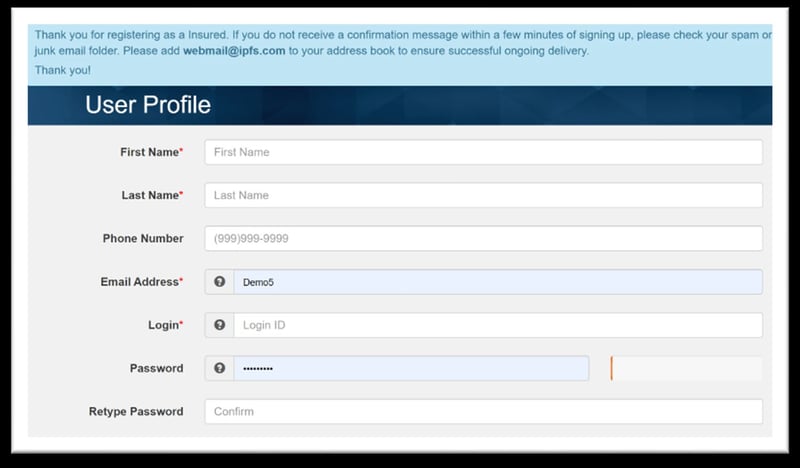
- Enable IPFS eForms to reduce paper mail and manage notifications digitally
Questions? Let's Chat
Have questions about your Stonemark or IPFS account? Submit your information below and an IPFS associate will contact you to provide support.